
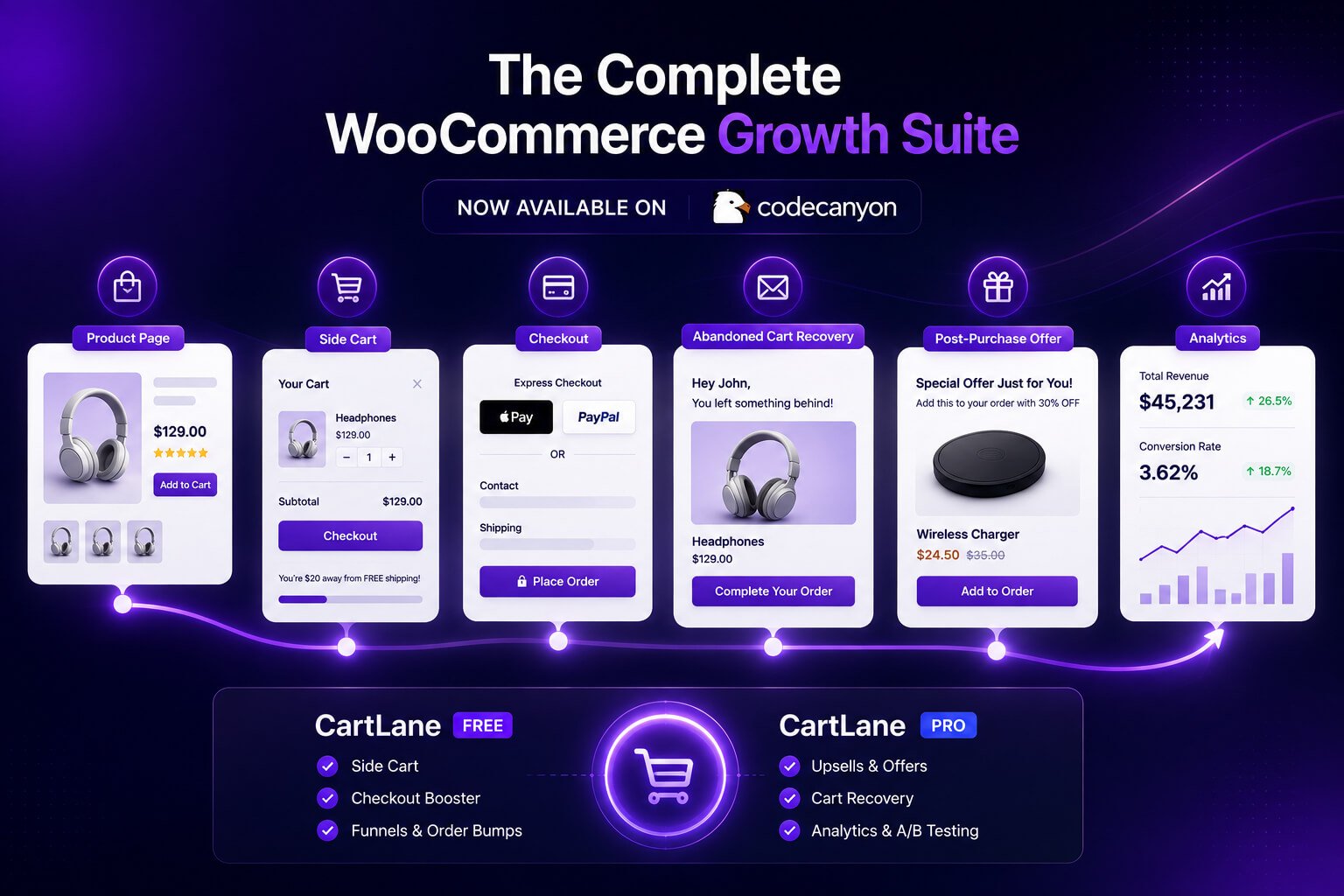
The CartLane WooCommerce plugin is now available on CodeCanyon as a commercial conversion toolkit built around one practical idea: the cart, checkout, offers, abandoned-cart recovery, and post-purchase journey should work as one connected system.
WooCommerce store owners often solve each conversion problem with a different plugin. One extension controls the side cart. Another edits checkout fields. A third handles order bumps. Recovery emails, product recommendations, funnels, pricing rules, and testing may all come from separate tools.
That approach can work, but it also creates more settings, scripts, data sources, compatibility checks, and places to investigate when something goes wrong.
CartLane takes a different approach. The free plugin provides the shared WooCommerce foundation, while CartLane Pro adds commercial modules for stores that need more advanced offer, funnel, pricing, and testing workflows. This launch article explains what the current release includes, how Free and Pro fit together, who the product may suit, and what you should verify before using it on a live store.
Disclosure: CartLane is developed by TopHive. Feature availability, compatibility, support, licensing, and pricing can change, so confirm the latest details on the official CodeCanyon listing and documentation before purchasing.
What Is the CartLane WooCommerce Plugin?
CartLane is a modular WooCommerce conversion plugin that connects the customer journey from product discovery through cart, checkout, abandoned-cart recovery, post-purchase offers, and performance review.
It does not replace WooCommerce. Products, customers, carts, orders, taxes, shipping, and payment workflows continue to use WooCommerce. CartLane adds conversion-focused tools around that existing store foundation.
The current product is split into two parts:
- CartLane Free provides the shared plugin runtime and core modules.
- CartLane Pro extends that foundation with advanced commercial workflows and license-managed updates.
CartLane Pro is therefore not a standalone plugin. The free version must be installed and active first.
This structure gives store owners a practical way to test the basic cart, checkout, order-bump, recovery, and analytics experience before deciding whether the Pro modules fit their store.
Why We Built a Connected WooCommerce Conversion Workflow
Conversion problems rarely happen in only one place.
A customer may struggle to review the cart on mobile, discover an unexpected checkout field, ignore an irrelevant add-on, leave before paying, receive no follow-up, and never see a suitable post-purchase offer. Installing a separate plugin for every stage can create a collection of features without creating a coherent customer journey.
The operational problem is just as important. When multiple plugins own different pieces of the flow, store teams may need to compare several dashboards to answer simple questions:
- Did the customer see the offer?
- Was the offer accepted or actually purchased?
- Did checkout fail after the bump was added?
- Was the abandoned cart restored?
- Which funnel path did the customer follow?
- Did a pricing campaign affect the order?
CartLane was designed to keep these workflows closer to the same WooCommerce products, orders, customer journey, and analytics foundation.
That does not mean every store should activate every module. A smaller store may only need the side cart and recovery tools. Another store may use order bumps and product recommendations but avoid post-purchase charging. The modular approach lets the store begin with the workflows it can test and maintain properly.
This is also why our broader WooCommerce content recommends diagnosing the buying journey before adding more tools. The guides on WooCommerce traffic but no sales and why customers abandon WooCommerce carts explain how to identify the actual point of friction first.
How CartLane Free and CartLane Pro Work Together
The CartLane WooCommerce plugin uses a Free-and-Pro structure rather than operating as two unrelated products. CartLane Free is more than an installer dependency: it provides the shared WooCommerce workspace and the core workflows that CartLane Pro extends.
What the free plugin provides
According to the current product listing and documentation, CartLane Free includes:
- AJAX side-cart functionality and cart controls
- Checkout optimization controls
- One active order-bump campaign
- Abandoned-cart recovery foundation
- Analytics and event-intelligence foundation
- The shared CartLane admin workspace and module system
The free version is available from the official WordPress.org plugin directory.
What Pro unlocks
CartLane Pro adds advanced modules for stores that need broader merchandising, post-purchase, testing, pricing, and campaign workflows. The current release includes unlimited active order bumps, post-purchase upsells and downsells, visual funnels, Smart Offers, A/B testing, dynamic pricing and BOGO campaigns, advanced targeting, Pro integrations, and commercial update access.
The important distinction is not simply “basic versus premium.” Free owns the shared foundation, while Pro adds commercial modules to the same CartLane environment. This avoids maintaining two unrelated interfaces for the same store journey.
Review the product before installing
Explore the live CartLane experience, review the current module scope, and confirm the Free dependency before purchasing Pro.
What CartLane Pro Adds to WooCommerce
The Pro edition extends the CartLane WooCommerce plugin with advanced offer, funnel, pricing, recommendation, testing, and post-purchase workflows. The following sections describe the current public release without assuming that every module is suitable for every store.
Unlimited order-bump campaigns
CartLane Free includes one active order bump. Pro removes that active-campaign limit, allowing stores to run multiple product-based offers across relevant cart and checkout contexts.
An order bump should support the original purchase rather than distract from it. Useful examples might include a compatible accessory, an extended service, or another clearly related product. The offer still needs accurate pricing, stock, tax, shipping, and cart behaviour.
Our guide to optimizing WooCommerce checkout explains why checkout offers should remain optional and easy to understand.
Smart Offers and product recommendations
Smart Offers let store owners build recommendation campaigns for different parts of the WooCommerce journey. Current campaign contexts include product pages, the CartLane side cart, checkout, and post-purchase workflows.
Recommendation sources can use manual product selection, products or categories, current-cart context, and existing WooCommerce cross-sell or upsell relationships. This can support workflows such as:
- Frequently Bought Together offers on product pages
- Complementary product suggestions inside the side cart
- Focused checkout add-ons
- Post-purchase recommendations when the workflow is supported
The value depends on relevance. Showing more products is not automatically better. A recommendation should make the current purchase more useful or complete.
Post-purchase upsells and downsells
CartLane Pro can create post-purchase upsell and downsell offers for related products, upgrades, bundles, or configured discounts.
This stage requires careful compatibility testing. Post-purchase charging depends on the exact gateway plugin, tokenization support, saved payment method, order state, and an available CartLane adapter. CartLane includes readiness checks and safe fallback behaviour, but the public listing does not claim universal support for every gateway.
That limitation matters. A store should never assume that a post-purchase charge path works simply because the original checkout succeeded. Review the current compatibility guidance and test the exact production stack on staging.
Visual upsell and downsell funnels
The visual funnel builder organizes checkout, upsell, downsell, and completion steps into a connected flow. Store teams can map accept and decline branches instead of managing each offer as an isolated screen.
A clear funnel can make campaign logic easier to review:
- What starts the journey?
- Which offer appears first?
- Where does an accepted offer lead?
- What happens after a decline?
- How does the customer reach order completion?
The visual canvas does not remove the need for testing. Every branch should reach a valid destination, and both accepted and declined paths should preserve the original WooCommerce order flow.
A/B testing for post-purchase offers
CartLane Pro includes A/B testing for post-purchase offer variants. A store can compare two versions of an offer and review views, accepts, declines, conversion, and linked revenue before selecting a winner.
Tests can compare meaningful differences such as offer copy, product, discount, or presentation. Avoid changing too many variables at once, because a result is difficult to interpret when every element is different.
Dynamic pricing, BOGO, quantity, and role-based campaigns
The pricing module supports percentage and fixed discounts, Buy One Get One rules, quantity tiers, customer-role pricing, product and category targeting, minimum quantity or subtotal conditions, and scheduled start or end times.
Flexible rules are useful, but pricing campaigns can become difficult to maintain when several promotions overlap. Test coupons, tax, shipping, product variations, customer roles, and cart recalculation before launch.
Connected analytics and event intelligence
CartLane Free provides the shared analytics foundation, while Pro adds offer, recommendation, funnel, and experiment activity to the same event vocabulary.
Current reporting can provide context around cart, checkout, payment, order, recovery, recommendation, upsell, downsell, funnel, and A/B-test events. Built-in CartLane workflow and analytics records are stored in the WordPress database; the included reports do not require a separate analytics SaaS account.
This information is intended for operational review. Store owners should still compare completed orders and revenue against WooCommerce reports and their accounting records rather than treating a single event dashboard as the only source of truth.
How CartLane Fits Across the WooCommerce Buying Journey
The easiest way to understand CartLane is to view it as a sequence rather than a feature list.
Before checkout
The product page and AJAX side cart can present relevant recommendations, make cart review more immediate, and reduce unnecessary page transitions. Customers can review items, quantities, coupons, and totals before moving forward.
During checkout
Checkout controls can reduce fields the store does not need, while order bumps and checkout add-ons can present relevant optional products. The goal is to maintain clarity—not to turn checkout into another crowded catalog.
After abandonment
The recovery foundation can capture eligible cart activity, run configured email sequences, use secure restore-cart links, and connect recovered orders with reporting. Inbox delivery still depends on the store’s WordPress email setup, SMTP provider, hosting, and sender reputation.
For a complete recovery process, read how to recover abandoned carts in WooCommerce.
After the original order
When the gateway and order context support it, Pro can route customers through relevant upsell and downsell offers. Visual funnels control the sequence, while A/B tests help compare variations.
During campaign review
Analytics connects CartLane-specific events with related cart, checkout, order, recovery, and offer context. This can help teams investigate what happened rather than looking only at top-line campaign numbers.
The connected journey is CartLane’s main positioning. The product is intended for stores that would rather coordinate these stages in one modular WooCommerce system than assemble a separate plugin stack for each step.
Who Is CartLane Designed For?
The CartLane WooCommerce plugin may suit store owners, agencies, freelancers, and developers who want to manage several conversion stages from one modular workspace. Their reasons for adopting it will differ.
WooCommerce store owners
Store owners may consider CartLane when customers are leaving between product selection and payment, average order value needs a more structured offer strategy, or recovery activity is difficult to manage.
Agencies and freelancers
Agencies often inherit WooCommerce stores with overlapping cart, checkout, pricing, and marketing plugins. A connected toolkit can reduce the number of separate interfaces the client must learn, provided the required integrations have been tested.
Developers and technical store teams
Technical teams may value modular activation, local WordPress data, WooCommerce-native order handling, REST-based administration, HPOS support, and documented hooks or endpoints. They should still review the current implementation against their own deployment, security, and maintenance standards.
Stores that want to begin with a free foundation
The Free and Pro structure suits stores that want to verify the core CartLane workflow before enabling commercial modules. The sensible path is to test the side cart, checkout, bump, recovery, and analytics foundation first, then add advanced modules one at a time.
When CartLane May Not Be the Right Fit
No conversion plugin is suitable for every store, and CartLane should not be presented as a substitute for diagnosis.
It may not be the right choice when:
- The store’s main problem is irrelevant traffic or weak product demand.
- Shipping costs, taxes, or pricing are not competitive.
- A required payment gateway lacks a supported post-purchase path.
- The business needs a specialized external CRM or enterprise marketing platform.
- A critical theme, checkout replacement, multilingual, multicurrency, tax, or shipping integration has not been verified.
- The team does not have time to test campaign rules and monitor results.
- The store only needs one small feature already handled reliably by the existing stack.
Installing CartLane also does not guarantee more sales. A side cart cannot fix a weak offer. Recovery emails cannot repair a failed gateway. An order bump cannot make an unrelated product useful. Funnels and tests still require good campaign decisions.
Stores concerned about extension weight should also review our article on heavy WooCommerce plugins. Replacing several tools with one platform may simplify a stack, but every enabled module must still be measured and maintained.
Requirements and Compatibility Notes
The current CodeCanyon listing states the following minimum requirements:
- WordPress 6.3 or newer
- PHP 8.0 or newer
- WooCommerce 7.0 or newer
- CartLane Free 1.1.4 or newer
At the time of this launch article, the listing reports testing through WordPress 7.0 and WooCommerce 10.9. These details can change with future releases, so check the current CodeCanyon item page before installation.
Important operational notes
- CartLane Pro requires CartLane Free. Install and activate the free plugin first.
- Post-purchase payment support is gateway-specific. Verify tokenization, saved payment methods, order state, and adapter readiness.
- Recovery email delivery depends on the mail environment. Configure and test a suitable transactional email or SMTP service.
- Checkout changes are revenue-critical. Test guest and logged-in checkout, taxes, shipping, coupons, payment methods, order emails, and mobile behaviour.
- Pricing campaigns can overlap. Validate discount precedence, BOGO rules, quantities, roles, and scheduled campaigns.
- Staging is essential. Test the complete buying journey before enabling modules on production.
The CartLane documentation includes installation, module setup, compatibility, gateway-readiness, troubleshooting, license, and update guidance.
How to Get Started with CartLane Pro
A controlled rollout is safer than enabling every module immediately.
1. Install CartLane Free
Install the foundation from WordPress.org and confirm that the CartLane dashboard loads correctly. Review module status and the current WooCommerce environment.
2. Test the core workflow
Before purchasing or activating Pro modules, test the side cart, checkout controls, one order bump, abandoned-cart capture, recovery email preview, and analytics recording.
3. Review the live demo and documentation
Use the CartLane live demo and product site to inspect the storefront journey and admin workspace. Read the setup and compatibility guidance for the modules you intend to use.
4. Purchase CartLane Pro from CodeCanyon
Review the latest price, license terms, support period, compatibility, changelog, and item details on the official CodeCanyon listing.
5. Upload and activate Pro
Install the downloaded CartLane Pro ZIP alongside the active free plugin. Enter the Envato purchase code in the CartLane license screen to unlock licensed Pro modules and eligible updates.
6. Enable one advanced module at a time
Begin with the workflow that addresses the clearest problem. For example:
- Use Smart Offers when product recommendations are missing.
- Use unlimited order bumps when one active campaign is not enough.
- Use a visual funnel when post-purchase routing needs structure.
- Use A/B testing when two meaningful offer variants need comparison.
- Use dynamic pricing when the store has a clearly defined promotional rule.
7. Complete staging and controlled production tests
Test both the expected customer path and failure paths. Decline an offer, fail a payment, remove a recommended item, use an invalid coupon, switch devices, and confirm that the original order remains safe.
Explore the CartLane release
Review the connected WooCommerce workflow, inspect the live demo, or open the official CodeCanyon item page.
Final Thoughts
The CartLane CodeCanyon release is not simply a larger collection of WooCommerce features. Its main purpose is to connect the buying moments that are often managed separately: product recommendations, cart review, checkout offers, abandoned-cart recovery, post-purchase journeys, promotional pricing, experiments, and analytics.
That connected approach may reduce operational complexity for stores that genuinely need several of these workflows. It can also give agencies and developers a more consistent place to configure and investigate CartLane activity.
But a connected system is only useful when the underlying strategy is sound. Store owners should still diagnose why customers leave, choose relevant offers, test payment and email infrastructure, review compatibility, and activate only the modules they can maintain.
The CartLane WooCommerce plugin is most useful when it addresses a verified problem across cart, checkout, recovery, merchandising, or post-purchase workflows. CartLane Free provides a practical starting point, while CartLane Pro extends that foundation for stores ready to build more advanced WooCommerce revenue journeys.
The next step is not to enable everything. It is to identify one verified conversion problem, test the relevant workflow, and measure whether the customer experience improves.
Continue Reading
- WooCommerce Traffic but No Sales? 12 Problems to Fix
- Why Customers Abandon WooCommerce Carts Before Checkout
- How to Optimize WooCommerce Checkout for More Sales
- How to Recover Abandoned Carts in WooCommerce
- How Heavy WooCommerce Plugins Affect Store Performance
Frequently Asked Questions
What is CartLane?
The CartLane WooCommerce plugin is a modular conversion toolkit for cart, checkout, order bumps, abandoned-cart recovery, product recommendations, post-purchase offers, funnels, pricing campaigns, testing, and CartLane-specific analytics.
Is CartLane Pro available on CodeCanyon?
Yes. CartLane Pro is currently available from the official TopHive CodeCanyon item page. Check that listing for the latest price, licensing, support, compatibility, and changelog information.
Does CartLane Pro work without the free plugin?
No. CartLane Pro extends CartLane Free and requires the supported free version to be installed and active.
What is included in CartLane Free?
The current public scope includes the AJAX side cart, checkout optimization controls, one active order bump, abandoned-cart recovery foundation, shared analytics, and the core CartLane admin environment.
What does CartLane Pro add?
Pro currently adds unlimited active order bumps, Smart Offers, post-purchase upsells and downsells, visual funnels, A/B testing, dynamic pricing and BOGO campaigns, advanced targeting, Pro integrations, and commercial update access.
Does CartLane replace WooCommerce?
No. CartLane extends WooCommerce. Products, carts, customers, orders, taxes, shipping, and standard payment workflows continue to use WooCommerce.
Is CartLane a SaaS platform?
No. Core store workflows run inside WordPress and WooCommerce. CartLane Pro uses external license verification for commercial activation and updates, but daily store operations do not require a separate hosted CartLane dashboard.
Does post-purchase upselling work with every payment gateway?
No universal gateway support claim is made. Compatibility depends on the exact gateway plugin, tokenization, stored payment method, order state, and available CartLane adapter. Review the current guidance and test the exact setup before production use.
Will abandoned-cart emails always reach the inbox?
No plugin can guarantee inbox delivery. CartLane can run the configured recovery workflow, but deliverability depends on WordPress mail configuration, SMTP or transactional email service, hosting, DNS authentication, and sender reputation.
Where can I test CartLane before purchasing?
You can review the CartLane live demo and product site, install the free version from WordPress.org, and read the public documentation before deciding.
Should I activate every CartLane module?
Not necessarily. Activate only the workflows that solve a verified store problem, then test each module with the active theme, products, payment gateways, shipping, taxes, coupons, caching, and mobile checkout.